Snap what’s around you.
Hear it in a new language.
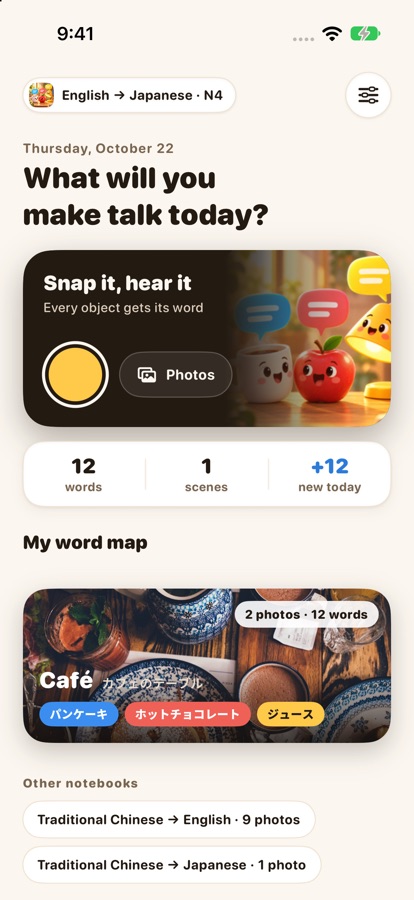
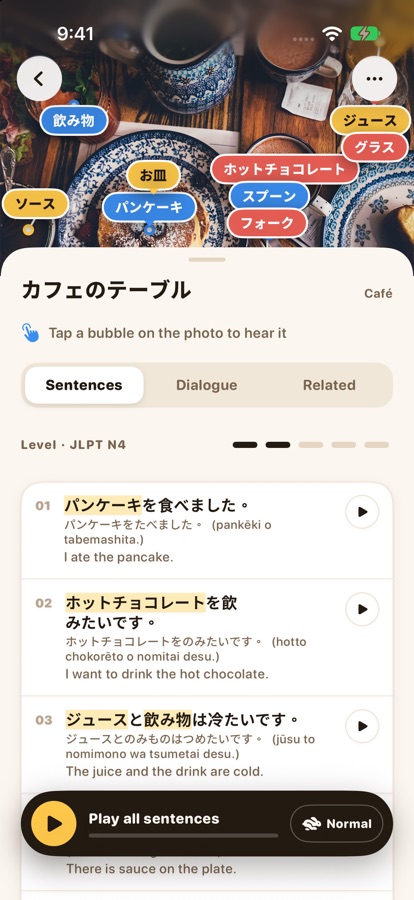
Take a photo and every object pops up a speech bubble with its word — tap to hear it. Then get sentences at your level and a short dialogue for the whole scene.
 cupリンゴla lampe컵 · 杯子
Three steps to turn everyday life into a lesson
- 1
Snap
A kitchen, a desk, a breakfast table, a supermarket shelf — the more things, the better.
- 2
Tap
Every object gets its word. Tap to hear it with its reading and meaning.
- 3
Say it
Five sentences at your level and a short dialogue to read along with.
One photo, much more than words
Words right on your photo
No dictionary, no typing. Nouns come with their articles in German, French, Spanish and Italian; Japanese with kana; Chinese with Zhuyin and Pinyin.
Tap to hear
Every word and sentence can be read aloud, slowly too. Play-all lights up what’s being read.
A two-person dialogue
A real conversation for the scene in your photo, read by two voices.
Related words
Snap a cup and get saucer, spoon and stir. Keep the ones you like.
Your word map
Photos sorted by scene — kitchen, desk, café and more — one notebook per language pair.
Same coffee, from first words to fluent
CEFR for English, French, German, Spanish and Italian; JLPT for Japanese; TOPIK for Korean; TOCFL for Chinese. Switch any time and the sentences are rewritten.
- N5コーヒーをください。
- N4コーヒーを一杯もらえますか。
- N3まだ眠いので、コーヒーをいれます。
- N2コーヒーを飲まないと、頭が働かないんです。
- N1一日を始める前に、どうしてもコーヒーが欲しいところです。
What will you learn?
The app speaks Traditional Chinese, English, Japanese and Korean. You can learn:
No account. Your photos stay yours.
Photos are analyzed with Apple’s Private Cloud Compute: used only for that request, never stored, and not accessible to Apple. Your word map stays on your device; the developer runs no servers and never receives your photos.
Requirements
An iPhone or iPad that supports Apple Intelligence, running iOS 27 / iPadOS 27 or later, with Apple Intelligence turned on (for example iPhone 15 Pro or later).
FAQ
Is it free?
Yes — download it free and use every feature. Full-screen ads appear at natural breaks; a one-time US$0.99 purchase removes them for good.
Why can’t my phone analyze photos?
SnapSay uses Apple Intelligence. Check that your device supports it, runs iOS 27 or later, and has it turned on in Settings > Apple Intelligence & Siri.
The voice sounds robotic. What can I do?
In Settings > Accessibility > Spoken Content > Voices, download a Premium or Enhanced voice for the language. SnapSay uses it automatically.
I switched languages. Where are my photos?
Still there. Each pair of your language and the language you learn has its own word map; switch at the bottom of the home screen.
What will you make talk today?
Coming soon to the App StoreQuestions or ideas? Email us: [email protected]